

Precision Engineering: Mastering the SysML v2 Code Editor
The Trust Deficit in System Modeling
In traditional system modeling, an error in logic or syntax often remains hidden until it’s too late. When working with a complex textual notation like SysML v2, you rely heavily on your editor to tell you if your code is correct. However, a common frustration with many SysML v2 tools is the prevalence of “ghost errors”—situations where the editor flags valid code as incorrect. This constant stream of false alarms doesn’t just annoy you; it destroys your confidence in the model and makes learning the language nearly impossible.
SysML v2 Studio transforms this experience. We’ve built a high-performance SysML v2 code editor that you can actually trust. By bringing the precision of professional software development environments to systems engineering, we ensure that if our tool flags an error, it’s a real issue that needs your attention. No more second-guessing—just precision engineering in a stable SysML v2 IDE.
A Trustworthy Companion for Complex Models
Our editor is powered by a robust Language Server Protocol (LSP) implementation specifically tuned for the SysML v2 standard. This creates a reliable environment for high-stakes modeling:
1. Validated, Trustworthy Diagnostics
Unlike other SysML v2 editors that may falsely highlight entire files as erroneous, our validation engine is strictly compliant with the SysML v2 grammar. When you see a red squiggle, you can be certain there is a syntax mismatch or a relationship violation. This reliability is the foundation of professional modeling.
2. The Problems Pane: Your Centralized Error Log
Located at the bottom of the workspace, the Problems pane provides a clear, actionable list of every issue in your model. It categorizes problems by severity (Error, Warning, or Info) and provides clear descriptions. Clicking any entry instantly jumps your cursor to the exact location of the fault, allowing for rapid debugging.
3. Intelligent Modeling Assistance
- Semantic Highlighting: The editor uses deep analysis to color-code your text based on the SysML v2 standard, making it easy to distinguish between parts, ports, and requirements.
- Smart Autocomplete: As you type, the editor suggests valid keywords and elements from your model, preventing typos before they happen.
Step-by-Step Tutorial: Reliable Error Resolution
In this tutorial, you will see how the editor helps you resolve real syntax issues without the distraction of false positives.
- Open an Editable File: Open the Navigator and create a Demo.sysml with just a line of content
part def MyPlaform;.
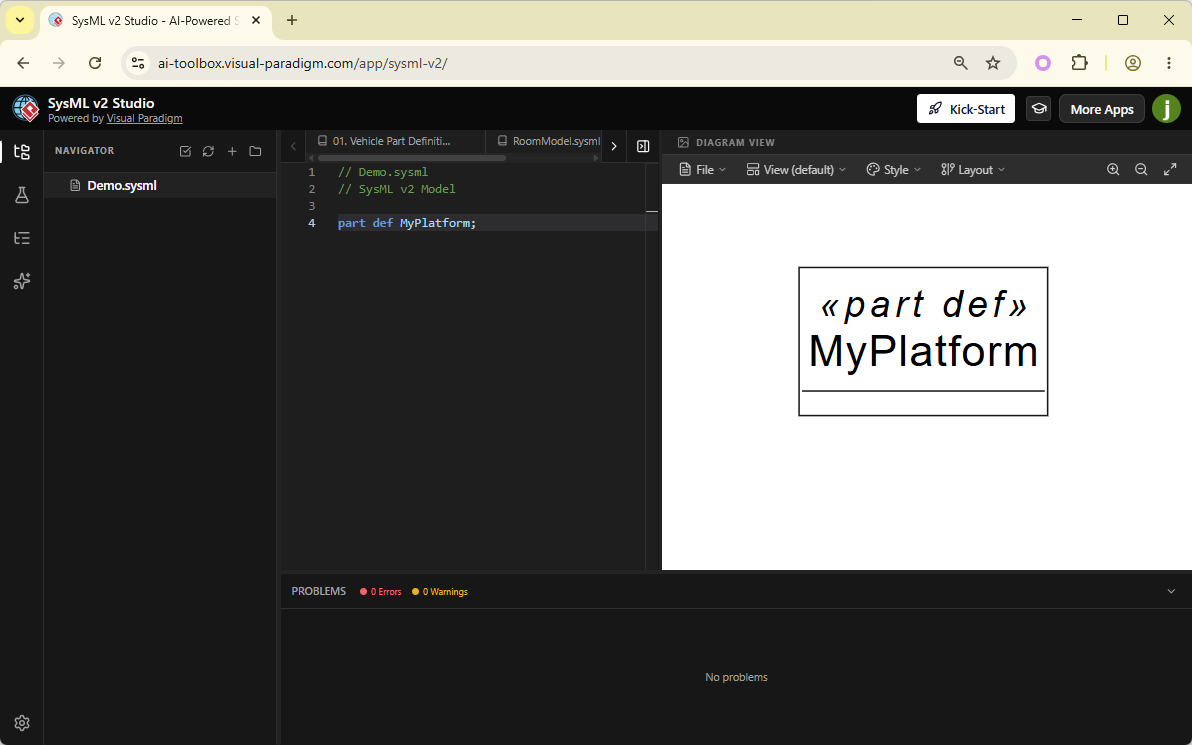
- Induce a Real Syntax Error: Delete the semicolon at the end or misspell the keyword (e.g.,
part def MyPlatform). - Observe the Accurate Feedback: Notice how the red squiggle appears exactly where the error is. Check the Problems pane—it will accurately describe the missing token or unexpected input.
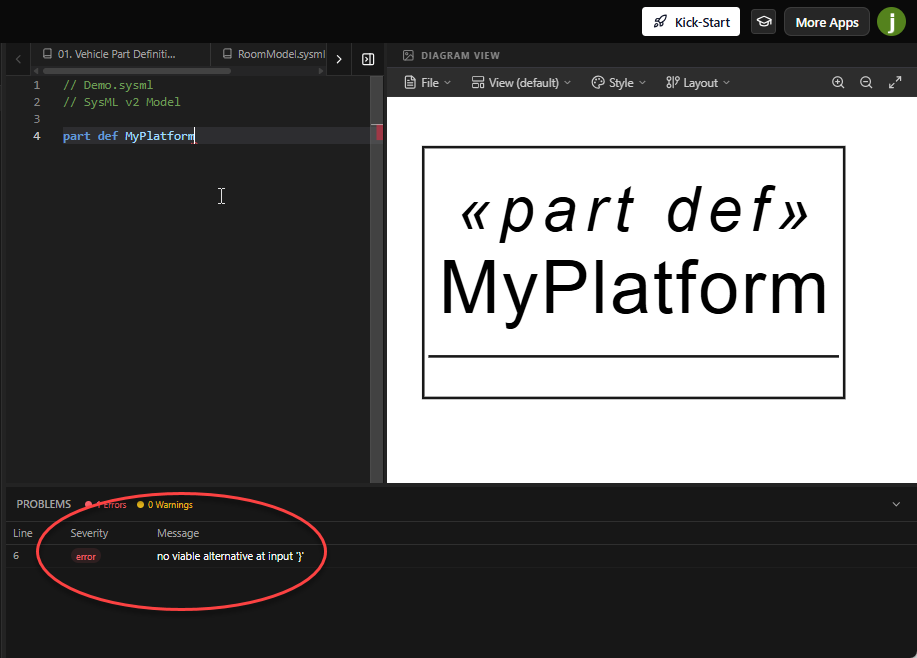
- Trust the Tool: If you are ever unsure about a syntax rule, rely on the editor. If the code is not underlined, it is valid. This “silent success” is just as important as the error reporting.
What You’ve Learned
By mastering the SysML v2 code editor, you have gained a reliable partner in your engineering process. You now know:
- Why trustworthy validation is critical for learning and professional modeling.
- How to use the **Problems Pane** to navigate and fix real architectural issues.
- The role of autocomplete and semantic highlighting in building valid models at scale.
With a verified model in place, you can now explore the visual side of your system. In the next chapter, we’ll see how our diagrams go beyond simple visualization by being fully interactive and editable.
